



HTML Page Builders
I’ve recently came across something called LaunchPages Pro, a custom-built GPT that is specialized in creating pure HTML/CSS pages for various tasks. It made me think about my first webpages, built in HTML, and since I’m using AI from time to time (not an expert, though), I’ve decided to test it. Boy, was I surprised. But let’s slow down a bit.
These days, everything seems to be running on automation. Every business out there seems to have a website (not really, IMHO) that supports ther business. The same goes for affiliates who promote other people’s products. Majority of these websites and landing pages (over 45%, the say) is built on WordPress, a large part of what’s left is built on various other page builders (like Convertri), and only a handful remain in pure HTML.
So, given we have so many options, why would anyone want to build pages in pure HTML/CSS combination? Doesn’t it require programming knowledge of HTML, CSS and additionaly JavaScript?
It does. It can really be a pain in the ***.
But still, there are applications where pure HTML/CSS pages are handy, and I’ve talked about it in the post HERE.
Let’s just repeat shortly the most likely scenarios simple HTML pages come real handy for:
- Bridge pages: if you’re an affiliate, you’ll want to direct the traffic to a bridge page and not directly to an affiliate link. This is to warm up the visitors, state the most important benefits of the offer, and help them decide.
- Opt-In pages: it was proven many times that simple opt-in pages convert the best. These can be built in HTML easily.
- Bonus pages: when you want to promote something, you want to start as fast as possible. So why complicate things?
And, there are purely technical reasons why someone would consider using pure HTML/CSS pages:
- They’re light and fast: nothing beats the pure HTML in action. Certainly not WordPress, because of the overhead it needs in order to function. Sure, it’s powerful, but do you need all that power? Not always.
- They will perform good on cheap hosting: WordPress pages get load times of about 2s and up if they’re really well optimised. And that’s hard to achieve. Pure HTML pages easily get load times of under 0.5s without no optimization needed. This means they can be hosted on a cheap shared hosting, costing you maybe $25/year, versus serious hosting accounts for WordPress that are easily priced at $150/year or more. Just do the math.
- Using powerful page builders is just expensive: Using tools like Convertri ($600/year) to create simple bridge pages is quite crazy, I think. Or WordPress builders such as OptimizePress ($250/year).
So yes, I firmly believe HTML pages have their place, especially if one is a beginner affiliate marketer, without a proper budget to feed these monsters.
If we assume HTML pages can be useful, let’s see how to create them most efficiently.
Using AI to build HTML pages
Of course, AI is the thing that comes to mind.
A simple ChatGPT chat can build us a great HTML page. Right? Not really.
ChatGPT knows a lot of things, and can actually DO a lot of things. But its answers are only as good as your promtps.
So if you open the chat and type “build me a webpage that will promote a product”, it will happily agree. And return total rubish. Don’t publish that, because it’s nothing worth publishing.
So how do AI page builders do it?
It’s all about their
Knowledge Base
Without a good knowledge base, AI will return a generic code that will look like someone from a kindergarten put it together. Yeah, kids are good with computers nowadays.
As an average human being, chances are you’re not fluent in HTML. Even less CSS, not to mention JavaScript. So you need a tool with an extensive knowledge that knows these things inside-out and also follows the latest principles and standards.
It’s just not enough to switch into a ChatGPT chat and start asking.
One needs a proper tool, and I believe I’ve found mine. It’s called
LaunchPages Pro
One of the best AI HTML page builders I’ve found so far that cost almost nothing is LaunchPages Pro, a custom-built GPT that runs inside a free ChatGPT account.
Once you run it, it opens a very simple dashboard.
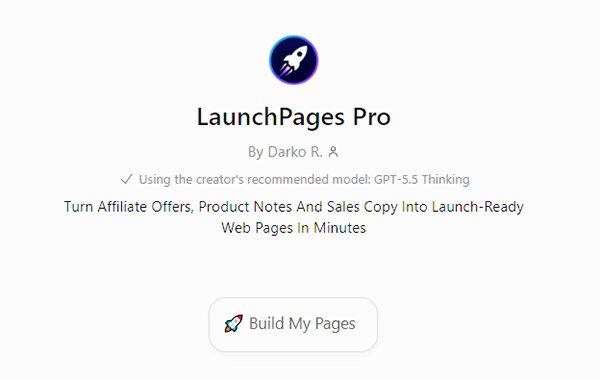
There’s not much going on, right? You can either click the button that says “Build My Pages”, which is a conversation starter, or start chatting. Let’s click the button; you will get a list of options and short instructions what to do next.
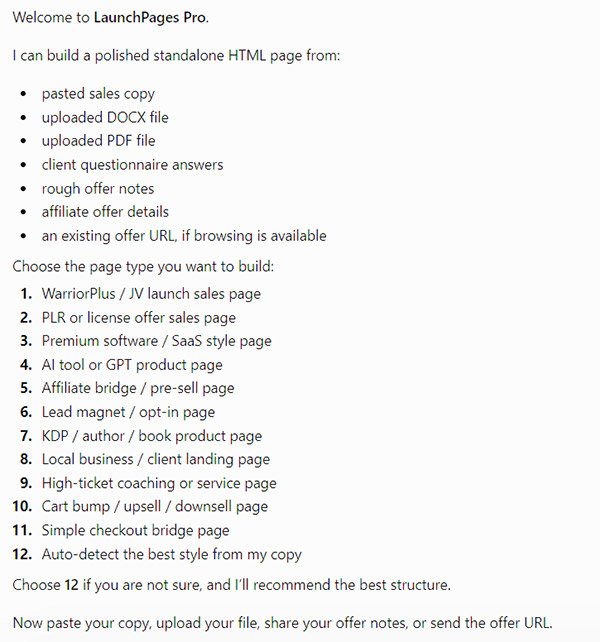
Now, that’s more like it. You can see the GPT can do a lot of things; I’m not going into all of them, as I’m pretty sure you know what they mean, rather I’ll talk a bit more about the option that I was personally most interested in – option 11, Simple checkout bridge page.
What am I using LaunchPages Pro for
Like I said, I’m using heavy-weight pagebuilders like Convertri and OptimizePress for most of my needs. I could easily create any of the pages mentioned here in those.
So why was I looking for a solution like this?
SPEED.
Imagine yourself deciding on a product to promote. It doesn’t matter whether it’s on ClickBank, WarriorPlus, Amazon, or something else. You find a produst and want to promote it.
The first thing you’ll do is read the salespage, possibly the affiliate page too, just to learn about the product.
Then, you fire up WordPress or Convertri and click that New Page button. You get a nice little window with nothing in it.
Yeap, a blank canvas you can do anything you want with. But do you actually know what you want to do? Yeah, I didn’t think so.
So it could take an hour or more to decide what you want to type, then it will take another hour to decide on the design and colors and style, and finally it will take another hour or more to polish it up and hit the Publish button.
Nah. I got tired of doing this, especially since I’ve started using LaunchPages Pro. Here’s my exact process.
How I am using LaunchPages Pro
There are several steps involved, and here they are in details.
Step 1: Choosing the page style
I open the GPT and type in
11, short, here's the URL: mydomain.comWhere mydomain.com is the sales page of the product I want to promote – usually my affiliate link.
ChatGPT goes into thinking mode for a minute or so, then gives me something it calls Page Vision: it describes the page it’s about to create.
Step 2: Confirming the style or requesting changes
If I like the Page Vision, I simply confirm it by typing in “build”.
If I don’t like it, I point it to the changes I want, like maybe
I want the page to be based on a light background (color), you choose the appropriate accent coloror something similar. Imagine you’re talking to your page developer – it’s exactly like it.
One special case here: LaunchPages Pro will include placeholders for me. This is basically where I’d have to replace them with my links, like the affiliate link for the main button, and footer links (Privacy, Terms, Support, whatever I need). This means I have to edit the HTML and replace those placeholders, but I found a workaround.
I’ve created a small text file (call it whatever you want) and the content is something like
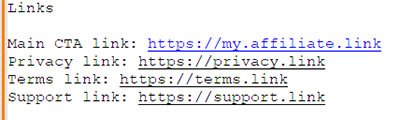
Then, before issuing the build command, I upload this txt file and type in
Use the uploaded txt file for links instead of placeholders where needed, don't use any other links. Build.After this command, the HTML I will get will already include the proper links as defined and I won’t have to edit the file myself any more.
Step 3: Checking the output
After another minute or two, I get my HTML file created. LaunchPages Pro will show it to me and let me download the file to my disk.
That’s it. My page is finished. And it takes about 3-5 minutes to complete these steps, now that I’m familiar with them. If you’re just starting, you’ll probably take a few minutes more, because you’ll want to read everything. And it’s OK – you should never trust AI completely, it can be pretty stupid sometimes.
Step 4: Publishing the page
This one is easy.
The file I’m downloading will be named by default and will be something like “productname-bridgepage.html”. While downloading, you can name it whatever you like.
Pro Tip: Since we’re dealin with AI here, you could easily specify the file name in the chat somewhere in the above steps, prior to the build command. This way, file will already be named correctly, and more importantly, you can even specify the canonical tag inside the file which Google will like. Even better, you could adapt the txt file I was talking about in step 2 above to include this info. Win-win.
Now, since I have my hosting account ready, I only have to upload this file there. I typically use a folder for those pages, called “/offers”, so my full url will be “mydomain.com/offers/myfilename.html“. This becomes the actual link I will promote.
How LaunchPages Pro actually creates my bridge pages
I’ve found out that LaunchPages Pro is smart enough to pick up the style of the salespage itself. It’s in his knowledge base and it does a pretty good job there, although sometimes it can miss by a mile. It’s to blame on ChatGPT itself actually, because sometimes it’s too smart for its own health. If that happens, just repeat the process, restarting the chat. It never happened in my testing that this problem would repeat twice.
The second thing LaunchPages Pro will do for me is pick up the most powerful points from the salespage, benefits and all. Again, it fails sometimes for the same reason as above, nothing a repeated job couldn’t fix.
The HTML file I’m getting includes the meta tags, the schema (very important for search engines), the inline CSS, as well as all the links I’ve specified during the build.
In short, it’s ready to publish practically immediately, although I would recommend checking all the links in the page. Just to be sure.
The main benefit of LaunchPages Pro
There are many types of pages LaunchPages Pro can create. I haven’t even tested all of them, to be honest. The main reson I’ve tested it were the bridge pages, which I really hate to create. They’re just boring, and they’re always depending on the product I want to promote – there’s just no “one fits all” rule. But here’s the benefit of using LaunchPages Pro that hit me the most.
Using LaunchPages Pro, I am able to create a fully operational bridge page for just about any offer in about 10 minutes – which is a fantastic result for me. Just in this process I’m saving at least 2-3 hours compared to my previous workflow. Since I’m promoting at least two or three products weekly, this already means a full day of my life saved.
Of course, I’m not just creating bridge pages, but one has to start somewhere. I am about to test also other page types LaunchPages Pro can create, and if they’re half as good as bridge pages, I will use it for many more tasks.
Fun fact
I’ve noticed in the FAQ section that the salespage for LaunchPages Pro was generated by LaunchPages Pro itself. While it’s not the best I’ve seen, it’s also not the worst I’ve seen. It’s actually more good than bad. And the fact that they’re selling it using their exact tool…. Well, I like it a lot. It’s not something you see every day.
Conclusion
Someone said we, marketers, will not lose our jobs to AI, but rather to other marketers using AI. I’m not really happy with that, but I have to agree. You either use it to your advantage or someone using it will be faster and more successful than you.
By saving me 4-6 hours per week, LaunchPages Pro already became one of my favorite tools I’m using almost daily. I’m pricing an hour of my time at $75 minimum, so the price I’ve paid for it ($47) already became just a rounding error for me.
I occasionally create pages for clients, too. And if I use LaunchPages Pro for that too, Imagine the ROI on that… 🙂
I can honestly just recommend this GPT. The initial investment of $47 paid out when I’ve suddenly had 2 hours free the first day I’ve started using it. Go check it out.






0 Comments