



Affiliate marketing needs automation
Anyone who ever tried to run an affiliate marketing business learned that there are many many moving parts in the process. From the first ideas about the product (or products) to promote, through building a campaign and all the assets needed, and finally running the advertising part – it can all be overwhelming, without real results in the beginning. Which is the main reason so many aspired affiliate marketers quit very fast. What we might not realize is that automation level possible today can drastically lower the effort needed and the time consumption of it all, bringing results much faster. Platforms like Zapier and Pabbly make it possible. How does WP Sync fit in this?
I’m not just talking about using AI. This is a separate chapter alltogether and deserves a whole separate book. I’m talking about basic automations that simply make our lives easier by doing repetitive things that take a whole lot of time out of our busy schedules.
Just think about a simple task of getting people who buy via your links and pick up your bonuses into the right lists in your autoresponders. Or, updating your analytics spreadsheet with the contact data obtained.
There are countless examples in the flow of affiliate marketing business that can really be automated to a certain degree, freeing our mind and schedule considerably.
Cloud or local?
Most automation solutions run in a cloud somewhere, like Zapier, Pabbly or Make, which are the main solutions that come to mind immediately.
It means you log into a dashboard, set your automation rules, save them and that’s it. You have to know what you’re doing, of course, if it’s not that obvious. This way, you can connect almost every software that exposes webhooks – and that means literally almost every software around.
There are two main reasons these solutions don’t get all our attention.
Price
Solutions like Zapier and Pabbly bill you by the number of tasks you use monthly. A task, in this context, is an operation your automation rule completes. If you move or copy a subscriber from one list to another, that’s at least 1 task (more likely 2 or 3). If you add a subscriber somewhere else, that’s a task. And so on.
Packages these solutions offer are pretty expensive. Zapier, for instance, will charge you $73.50/month for 2k tasks. If you decide to pay yearly, you’ll get 33% off and pay “only” $49/month (that’s $588/year).
Pabbly, on the other hand, offers a package that costs $19/month with 10k tasks included, and $16/month (that’s $192/year) with yearly payment.
The difference is already massive, and additionally, Pabbly calculates tasks a bit different – all internal tasks are free. Which means, comparing to Zapier, instead of 10k tasks it’s actually closer to 11k or even more, depending on the workflows you need.
To be honest, to really compare the functionality to Zapier’s, you’d have to choose the Unlimited plan at Pabbly, simply because some of the functionalities are only included there. But, this plan gives you unlimited tasks, so again… This plan costs $69/month and is comparable to Zapier’s by functionality and price, but is not limited in tasks.
In any case, if your needs are modest, you’ll end up paying at least $192/year for Pabbly’s cheapest plan. Which is what I’m paying, by the way.
Security
Don’t take it wrong, I honestly believe these platforms are secure, at least as much as any online platform can be.
The problem my mind sees is elsewhere.
Every workflow you create connects two (or more) apps via webhooks or callbacks. The problem (is it a problem…?) my mind can’t get around is that initially I always have to pass MY DATA to some server somewhere.
Not that we’re not getting used to it, really, since more or less everything is in the cloud somewhere. But still, some say there is no cloud – it’s just someone else’s computer. And I still don’t like it.
Is WordPress capable of acting as an automation server?
Sure is. It supports all technologies needed for that.
Of course, if I get back to security questions – we all host WordPress somewhere, right? So my data is already in the cloud, whether I want it or not. Even if you’re using a VPS server, you’re still renting it from some provider. But still, I have a much better feeling about it. I can do something about it, right? I can install security plugins and run strict privacy policy and so on.
I’m not really sure we’re doing anything different than with Zapier or Pabbly, it just feels much better. And maybe that’s enough.
A WordPress Automation solution: WP Sync
Recently I’ve come across a WordPress plugin that promisses connecting 150+ apps right from WordPress dashboard. It’s called WP Sync, created by Kevin Fahey, a many-figures product vendor and affiliate.
I’ve decided to take it, so I did. So what’s inside?
WP Sync has a growing base of supported apps. Currently, this number is at 172 (from 150 two weeks ago) and includes all sorts of online apps marketers use. This includes autoresponders, calendar and webinar apps and many more. Additionally, it supports webhooks, meaning you can actually connect anything that exposes them.
WP Sync: Functionality
The main reason WP Sync was created was to obtain the means of running simple automations without paying $500+ every year. Simple automations mean syncing data from source to target platforms. Here are some examples:
- Adding subscribers to more than one autoresponder for backup or different use cases
- Adding data to Google Sheets when something happens (the trigger)
- Passing data to another app, like syncing your Calendly input into a Webinar invitation
And more. You can actually think about 10 different things you could do this way in your business right away, can’t you?
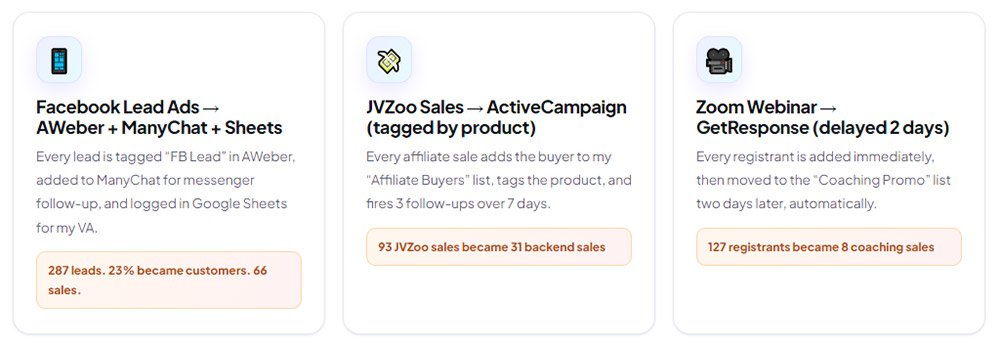
Here’s an example that Kevin has posted from his testing; he used Facebook Lead Ads to gather subscribers, then promoted an offer on JVZoo to them. Here’s the workflow.
- First, he ran a Facebook Lead Ad where he got 287 leads. Those leads were routed to his autoresponder, tagged, and the promotional sequence was fired. From this sequence, he made 66 sales on JVZoo.
- He has made $2,055 from those sales on JVZoo.Every buyer was added to the upgrade sequence automatically, which resulted in 31 additional backend sales.
- Additionaly, the buyers were routed to a webinar registration, promoting his own training program 2 days later, where he made additional 8 sales.
The main story here is that he’s made $6,905 alltogether, including the initial $2,055 from JVZoo sales – and those additional $4,850 came from automating the process.
Now, clearly one could do all that manually. Export the Facebook leads, import into an email campaign, then into the webinar software, and tag everyone so they enter the promotional channel.
But you can probably imagine the work needed, not to mention the right timing has to be precisely targeted.
By using WP Sync, it all happens automatically. Once the lead hits the Facebook Ad, it is added to the autoresponder and webinar software.
What WP Sync can’t do
WP Sync is primarily used to pass data from source to target apps. What it can’t do is act on the data in between.
For example, you have an optin form that collects user data. That’s ok and WP Sync can pick that up and forward it to whatever destination.
But let’s say there’s a special field in you form that the user can check to get additional data (like “I’m interested in XY also“). The way this should be handled, depending on your demands, is for software to let you create some conditinal logic. Meaning, if the user ticks this do A; if he does not, do B. WP Sync can’t do that, at least not on its own.
Another example for instance is when a purchase is made in your Woocommerce store, you’d like to route this data depending on tha order amount. If the order is below $100, do A; if it’s above, do B. No, you can’t.
A question about that was already raised inside Kevin’s support team, and they’re most probably looking into it. But for now, such things are not supported. If you need conditinal logic, look at Pabbly or Zapier.
The same goes for human interaction.
For instance, when data from the mentioned form hit the database, one could request a human should decide what’s next. No such thing exists in WP Sync.
To be clear: WP Sync is not a full-blown automation platform. It is targeted towards marketers who need the basic automation level, meaning moving data between apps basically unchanged. That’s it, and the vendor never denies that fact. It’s more than enough for almost every marketer, though.
So, to put it shortly – if you need advanced functionality like human interaction, email parsing or conditional logic, use the big ones – Zapier, Pabbly or Make.
If you’re an average marketer, WP Sync will most probably cover 99% of your needs. For me, that’s enough.
WP Sync pricing
This is one of its bright sides.
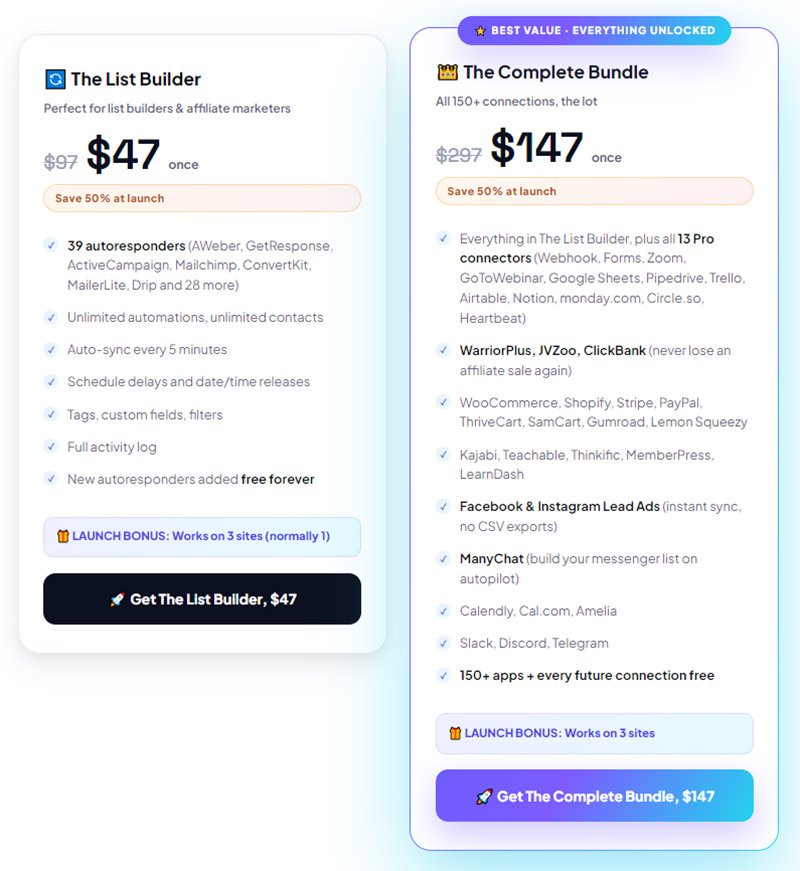
WP Sync is (for now!) available for one payment of $47, if you just need the autoresponders automation. This includes 39 autoresponders (AWeber, GetResponse, ActiveCampaign, Mailchimp, ConvertKit, MailerLite, Drip and more), with unlimited automations, contacts, tags, filters and custom fields. It sync contacts automatically based on your rules every 5 minutes.
The full package, including 150+ apps and packages (including calendar apps, affiliate networks, Facebook & Instagram, webhooks and more) is available for $147. One time. Lifetime.
In both cases, one gets to install the plugins on 3 sites as a special bonus, meaning three automation hubs.
Compared to Pabbly or Zapier, it’s a bargain. Just do the math over a period of 3 years – Pabbly would cost $576, Zapier even $1,764. Both with additional functionality, but if I don’t need it, I won’t pay it. WP Sync, however, costs $147. Once. No rebills.
I have my Pabbly account paid until February 2027 (those $192 I’ve mentioned). During this time, I plan to slowly move every workflow I have created there to my WP Sync installation. It is some work, for sure, but well worth the effort, because next year I don’t have to pay to Pabbly anymore. Could probably move my automations (I only have about 20 of them active) in a day, but I’m not in a hurry. I will surely come up with some additional possibilities to use the automation during this time.
WP Sync Bonus
If you like what I wrote here, then go and see WP Sync yourself. There’s a little demo on the sales page that will give you more context I could ever do in a post.
And if you decide to buy it via my link, I will send you a bonus that will make it free.
Bonus 1
ClickMagnet Creatives (Value: $97) is my own GPT and is a full professional art studio in a box. I needed it to be able to quickly create professional-looking graphics for my affiliate campaigns (product shots, boxes & mockups, ads, speaker & webinar promo graphics, portrait shots, and more). It is a one-stop system that is fed by professional knowledge base about photography and graphics. It’s a custom-built GPT and it’s yours free with WP Sync.

Bonus 2
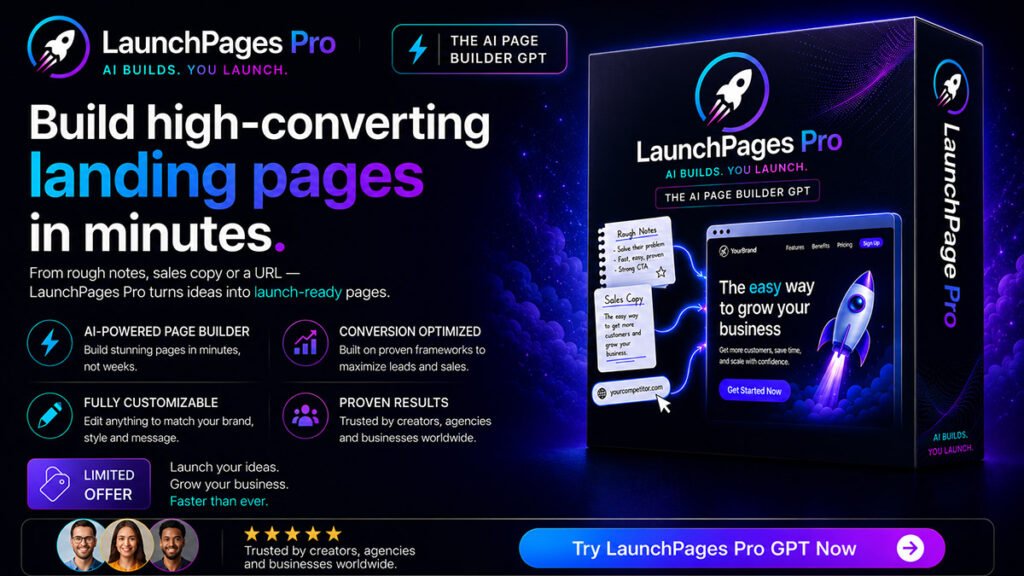
LaunchPages Pro (Value: $97) is another powerful GPT that creates polished HTML pages that can be instantly uploaded to any cheap hosting. For your affiliate campaigns to be successful, you’ll need promo pages, bridge pages, and funnel pages – and LaunchPages Pro creates them from your rough material, notes ans sketches, or even an offer URL. No limits, just results, saving you hours per every campaign.
Conclusion
Speaking of affiliate marketing, one can hardly ignore the power of real time automation. Moving subscribers around, adding them to specialized promotional sequences, and more, all those things can play a very important role in a marketing workflow.
While all of those operations can easily be done manually, with no software cost at all, one has to pay it with time. Moreover, this gets paid with missed opportunities, because in marketing, speed matters. You simply have to contact your subscriber (or buyer) while they’re still interested. If you miss this point and do it tomorrow, chances are they’ve already forgotten all about your promo and the reason they’ve clicked that ad.
WP Sync is perfect for
✅ Marketers & list-builders already paying a monthly automation bill (Zapier, Make, Pabbly)
✅ WordPress site owners who want automation without another SaaS subscription
✅ Agencies & freelancers running automations across multiple client sites
✅ Course creators, e-commerce sellers, and coaches moving buyers into sequences
✅ Anyone tired of task caps and usage-based billing on their own data
Who WP Sync is not for
❌ People who don’t run a WordPress site
❌ Anyone expecting an enterprise iPaaS with hundreds of niche B2B SaaS endpoints
While WP Sync does not provide the level of automation Pabbly and Zapier do, what it does good is more than enough for any average affiliate marketer – or vendor, of course. And if you need more, if you’re a SAAS vendor or developer, you probably can afford the cost and complication of big systems.
For me, it seems like a perfect solution – at least until I make my first million online (ha!). I sincerely recommend you to take a look. And don’t be afraid of new ideas you’ll get once you see it in action, because that’s why WP Sync exists in the first place.
Thank you for reading!






0 Comments