


Building early websites
I’ve been in the IT and Internet business for quite some time. Long enough to remember modems connected to our phone line, running at 2,400 bits/s, and BBS services (Bulletin Boards) that were the meeting points online back then. Soon after early ISPs emerged, giving people opportunity to create something called a website, using nothing but basic HTML code. Oh boy, it was interesting. Oh boy, am I old.
When tools like Dreamweaver and Microsoft Frontpage emerged, it was like the universe smiled on us geeks. Suddenly it was possible to – almost – draw what you wanted to build, and the software made its magic and converted it into an often unreadable code that early browsers supported. And there was also this strange thing called CSS (Cascading Style Sheets) that made it possible to style everything separately, building design rules separated from the text content…
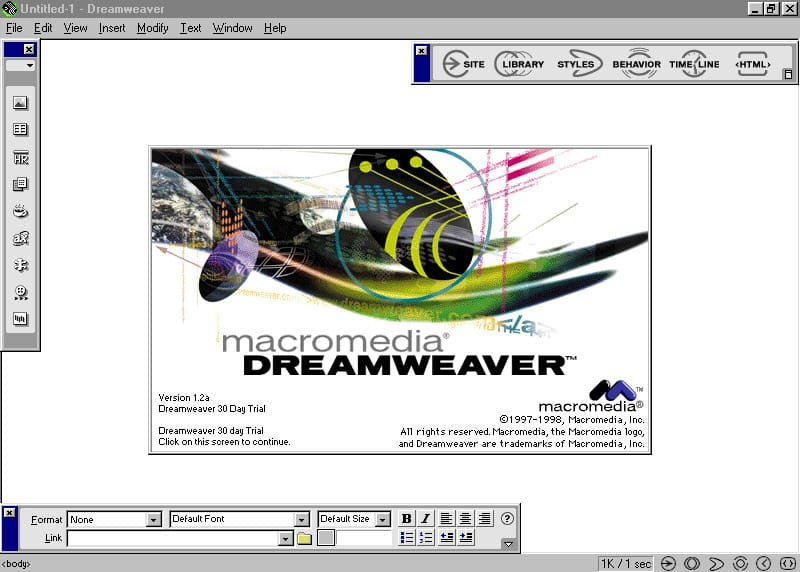
Those days are long gone.
Nowadays, we all have 100+ M internet connections that bring whatever we want to see to our screen almost instantly. We have online shops that deliver anything to our doorsteps. And we have gazillions of tools to build our own websites easily for whatever purpose we want, including images and videos and – well, whatever we want. Literally.
Once you decide you want a website, there’s only one big decision to make. What tool to use in order to make it as easy as possible for yourself.
Modern Page Builders
There’s no shortage of systems you can use as your platform – from Wix to Joomla or OpenCart and the like, they all work. There is one that stands out in particular, though, because it’s so well accepted and liked that it actually powers over 40% of all websites in the world – it’s WordPress.
Why did WordPress become so popular
One of the main factors that powers its popularity is of course its price – it’s completely free to use. The creators made it with bloggers in mind (a category that became very popular during the early 2000s) and never had planned it to go much beyond that. What they did plan is for it to be modular and expansion ready, allowing people to create their own modules (plugins). That was something that exploded and today you can build practically anything on top of WordPress.
There was a really short step from a plugin to a complete building system inside WordPress. And among other things, page builders were invented, just like that.
Page Builders
The idea of a page builder is not entirely new. Dreamweaver had it, and so did Frontpage. They even supported plugins, but honestly they were closed systems and creating anything on top of them was really, really complicated. I’ve tried and failed miserably.
WordPress changed that completelly. It’s open-coded, built on top of a good old PHP, Javascript and CSS, and with just the basic knowledge of them you can build a plugin to do something entirely specific in a single afternoon. Moreover, you can publish it online and sell it to others who need this specific functionality.
The problem that someone building websites encountered was the learning curve. In order to create a complete website consisting of several pages that make sense to a visitor, one had to learn the structure and take time to support and update it as neccessary and requested.
Here, page builders made a real difference. Using one of those, you can now simply draw the elements on your page (well, almost…), and WordPress will do the rest. It’s just like magic.
One of the first page builders I have tried was WPBakery Page Builder. Later on, I’ve worked with Beaver Builder and of course Elementor. Out of these, Elementor was my favourite and I’m still using it today occasionally. But in early 2019 I came across something called Divi (I believe it was Divi 3 at the time), and I was instantly hooked.
Why I decided to go with Divi
To explain this, I must point out a few facts.
First, as you may deduct from my intro to this post, I’m no stranger to programming. I have worked with computers since late 80s and my first software was written in Basic, running upon a CPM operating system (does anyone know about these?). I’ve done my share of Cobol and Fortran programming later while studying, and have used Clipper with IBM DBase platform extensively on MS-DOS. Later on I’ve used MS Visual Studio, mostly C#. Finally, I’ve settled for PHP, Javascript and CSS trio, making a good base for web programming. I’m actually able to build many things online by myself.
All that is not so important – the most important thing connected to all that is that I’m getting tired of programming. I’m over 60 now, and every new thing I have to learn just takes a bit longer than it used to. And as you might know, today’s tech is all about new things every single day.
Second, even if I wanted to continue using some or all of the tools mentioned, there’s little need for that in my world these days. I’m not taking in any more projects that would take months of planning and then months of building and testing. I just don’t. The main field where I can really do my best today is web programming, and even here I’m trying to limit myself to projects that don’t hurt too much. And of course explore the AI possibilities, but that’s another story.
That being said, I want projects that are fun to plan and fast to build.
And the WordPress – Divi combination seemed perfect for that.
What is Divi?
Divi is a premium WordPress theme. If you’ve worked with WordPress, you’ll know what it means. If you haven’t – a theme is an add-on to WordPress that defines its own design and functionalities upon what WordPress natively supports.
Divi, at its core, is exactly that – a theme that lets you build your own site, using its modules, designs and add-ons.
On top of that, it includes some functionalities that add even more value.
Divi Licensing
One thing that makes Divi special is its licensing model.
Most of the builders (all of them, for what I know) are licensed per site. This means that you will get a license key you can use on a certain number of websites. If you want to go beyond that, you’ll pay for more.
Additionally, all are based on subscription billing. It’s usually a yearly subscription, and you will have to renew it every time in order to receive updates and support. It’s important, don’t forget, because WordPress and the net change rapidly. Failure to update your websites can and will cause troubles down the road, either with the design and functionalities, or even security.
Divi has none of that. No, I’m lying – you can actually sign up for a yearly subscription, I believe it costs some $70. But Divi also offers a lifetime membership, something usually unheard of. It will cost you $249 (much less during the Black Friday and Cyber Monday sales), with unlimited updates.
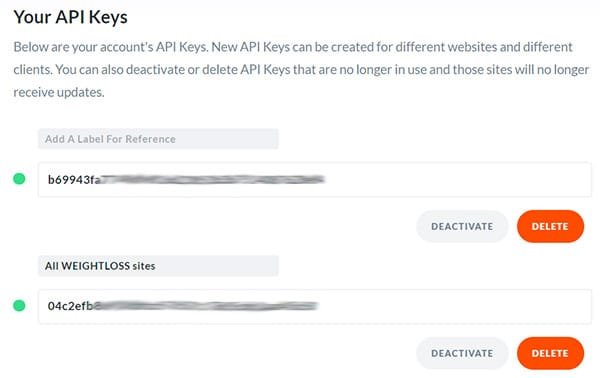
Then, this license will cover any number of websites you build. Yes, it’s unlimited. Divi even lets you create your own license keys, so as an agency, for instance, you can charge the customer for Divi itself and give a personalized license to the them. It’s a great choice for agencies serving multiple customers.
A note on licensing
WordPress requires every add-on, be it a theme or a plugin, to use its own license model. This means that every add-on you will buy will continue to work after the license is outdated, but you will no longer receive updates and support from the vendor.
Since WordPress itself is changing rapidly, improving the security and functionality, add-ons must follow this. Failling to do so will surely result in either website failure (design breakage upon server updates, for instance) or even worse, open security holes that attackers can use to get access to your website and all the data within.
It’s the same with Divi and any other page builder out there.
Divi Theme Builder
It sounds a bit funny – if Divi is a theme itself, how can it include a theme builder?
Since Divi 4 came out a couple of years ago, it included a theme builder that lets you define how your content is shown to the public. This was a concept that made many new things possible.
Imagine having lots of posts that you have organised in certain categories. Now, you want these posts to be displayed differently depending on the category. For instance, posts about cooking will have different design than posts about gardening. This different designs include colors, styles of images and/or buttons, even typography (fonts used).
To be honest, with a bit of programming (Javascript and/or CSS) you can do that in every WordPress display.
But inside Divi, using the Theme Builder, you can do that without ever touching any code. You simply create layouts that fit your needs and include all the requested design options and assign them to certain elements within WordPress. These include posts, pages, posts of specific categories, and so on.
You can go as crazy as you want with it, defining a different layout for just about everything. But it does not really make much sense, of course. It’s a tool that helps you maintain your site and keep it in line, it was not meant to make your life even harder.
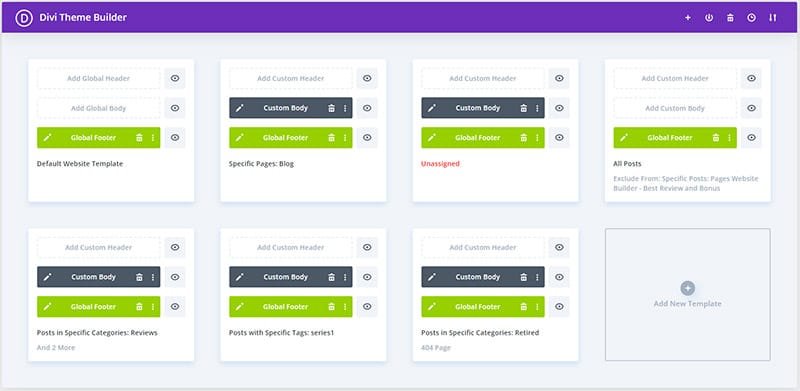
So when a post from a specific category is shown, it will use the assigned layout and display exactly how you wanted it to. Easy.
Similar goes for the headers and footers. You may want every page on your website to display the same header and/or footer, but then you may want some pages to have a different look altogether. Again, with a Theme Builder, you design what’s needed and assign the template to certain pages.
The options are almost unlimited, and using Divi’s built-in modules, you can build whatever design you need.
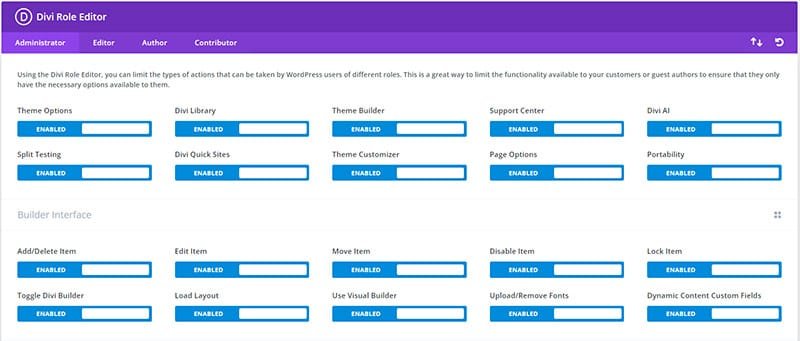
Role Editor
One thing that was always tricky is letting the page you’ve created in the capable hands of the user.
If the user is too excited or not exactly a WordPress connoisseur, or if they even meet the page builder for the first time, it’s tremendously easy to do something that should never be done. This usually results in design problems, or even in a complete website crash. The guilt is of course always on you, because it should not be possible.
In reality, WordPress being open-code is an ideal environment to crash things. Divi came up with an included Role Editor that lets you limit what users can do, based on WordPress’ own user limitations.
This way, you can safely create a separate account for the user that lets him do practically everything, but limit what they can do with Divi environment. You can limit them to not be able to change the templates built in Theme Builder, for instance.
This function alone has saved more contracts than you can believe.
Adding functionality to Divi
Out of the box, Divi includes modules for most of what you want on the website. This includes text, imagery and videos, captions, titles, comments and so on.
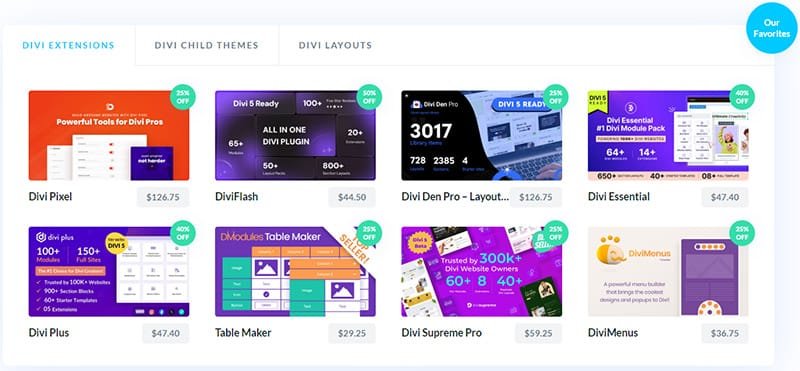
There are times though when these are not enough. Being a so-called universal theme, Divi simply cannot include just about everything people might need. In such cases, you will need add-ons from 3rd party developers that will do that exact thing you want.
Luckily, Divi’s 3rd party developer pool is really huge. There are thousands of plugins, layouts and code snippets available that will let you do whatever you want. Elegant Themes actually runs a Marketplace where developers publish their add-ons and you can find almost anything there.
Additionally, Divi fully follows the WordPress principles and supports code snippets. This means you can add your own code Javascript or CSS to any page easily, or expand the whole website functionality using shortcodes and snippets directly inside functions.php file. If you’re familiar with the basics of Javascript and CSS, this means you can actually add funtionality to any component inside any module throughout the website.
Divi Updates
Divi is updated regularly.
Since being a member, I’ve seen updates coming in practically every two weeks. Sometimes a bit longer, sometimes a bit shorter, but updates including both security as well as feature upgrades were always regular.
A word of caution
As every software, WordPress and Divi (and any other tool, to be precise) are prone to bugs. This means it’s not always wise to update immediately, especially for major versions – meaning big changes are included. It’s usually better to sit down and wait for an update or two, just to be sure that it has been cleared of possible bugs as much as possible.
For instance, when Divi updated from version 3 to version 4, this was almost like a completely new product. Many of us tested it on local and testing sites, but many people updated their live sites immediately. This caused a number of problems, both because it was so different and because it brought some bugs with it. So waiting for version 4.1 or 4.2 proved to be a much better decision for live sites.
Divi 5
Right now, Divi 5 is getting ready to launch. It’s currently in version Beta 5.3 and is in the process of cleaning up the mess that comes when major changes are done to the system.
While Elegant Themes says it’s ready for production sites, it’s only partialy true. The changes that were done under the hood are so extensive that there’s a whole new world of bugs introduced to the community. I can safely confirm that it’s ready for simple sites which include only the basic functionalities of the theme, using native modules. But many newly added features, such as much awaited module nesting and loop functionality, are causing some heartache.
You can see some more info on that on https://divilegends.com.
Anyway, the main change that was actually needed for the sake of keeping up with other builders was a complete rewamp of the core code. This caused Divi 5 to be much faster, much easier to expand with new modules, and the visual editor is much more responsive now. All in all, it’s a fantastic upgrade, but will take some more time to be completelly safe to use on sites that bring money.
Here’s a short preview of the new Visual Builder from Elegant Themes website.
Is Divi 5 free?
If you’re a member and have bought Divi anytime in the past (lifetime), yes, you will receive your Divi 5 free of any charges, following the Elegant Themes licensing practice.
This means that even if you enter the Divi world right now, you will get it when it launches. Or, you can download the free Beta version and start learning.
Divi Cyber Monday Sale
At the time of writing this, Divi has opened the Cyber Monday Sales for their software.
This means you can get the basic Divi license for mere $187 (normally $249), and it’s a lifetime deal, no monthly/yearly fees ever.
Bundle packages, including Divi Cloud, Divi AI or some other products, are priced up to 80% off. You just have to see it to believe it.
Additionaly, entering it right now will bring you bonuses; Elegant Themes has over 4,100 free products ready for new members. They include products from its own marketplace and extend the value of the package tremendously. If you’ve ever thought about getting in, this is probably the best time of the year.

Conclusion
I’ve managed to write down only a part of what Divi can bring you. If you want to read more, head on to DiviLegends, or even directly to Elegant Themes. You have a lot to read there, and if you decide to join, you’ll have a top notch tool in your toolbox for any of your future projects.
Thank you for reading, I wish you a lot od success.






Fantastic goods from you, man. I’ve bear in mind your stuff prior to and you are just too wonderful.
I actually like what you’ve bought here, really like what you’re saying and the
best way by wwhich you saay it. You’re making it
enjoyable andd yoou still care for to keep it sensible.
I can’t wait to learn much more from you. That is actually
a wondertful site.